Three new AI tools for managers are now available
Talent reviews, appraisals, and role clarity all take time, especially the documentation around them. Three new AI assists in Talent Portal are ready for managers: record and transcribe TBS meetings, get a comparison briefing before you write a Manager Review, and draft internal job descriptions from a template. Less time on paperwork. More time with your people and decisions.
|
1. AI Recording & Transcription (Talent Bench Strength)
Running a talent review meeting and then typing up notes afterward takes time away from the people in the room. With AI Recording & Transcription in TBS, you can stay present in the conversation, and let the system help with the documentation afterward.
What you get
- Record directly from your TBS form: no separate app or device needed
- AI transcription with speaker detection, so you can see who said what
- Smart summary with key topics and action items pulled from the meeting
- One-click form fill: AI maps the discussion into the form you are already working on
|
|
How it works
- Open your TBS form (Scribe Notes, Goals, Culture, Temperature, Career Discussion, or Leadership Aspiration) and click Record
- Confirm consent and tap Start Recording during your meeting
- Stop and upload when you are done. AI transcribes and summarizes automatically
- Click “AI Fill This Form”: review the suggested answers, edit anything you need, then save
Privacy
Recordings are encrypted and only accessible to authorized users. You must confirm that all participants have consented before recording starts. You can delete a recording at any time. AI fills the form for you. Always review the suggested content before saving or signing off.
|
2. AI Manager Review Summary (Appraisals)
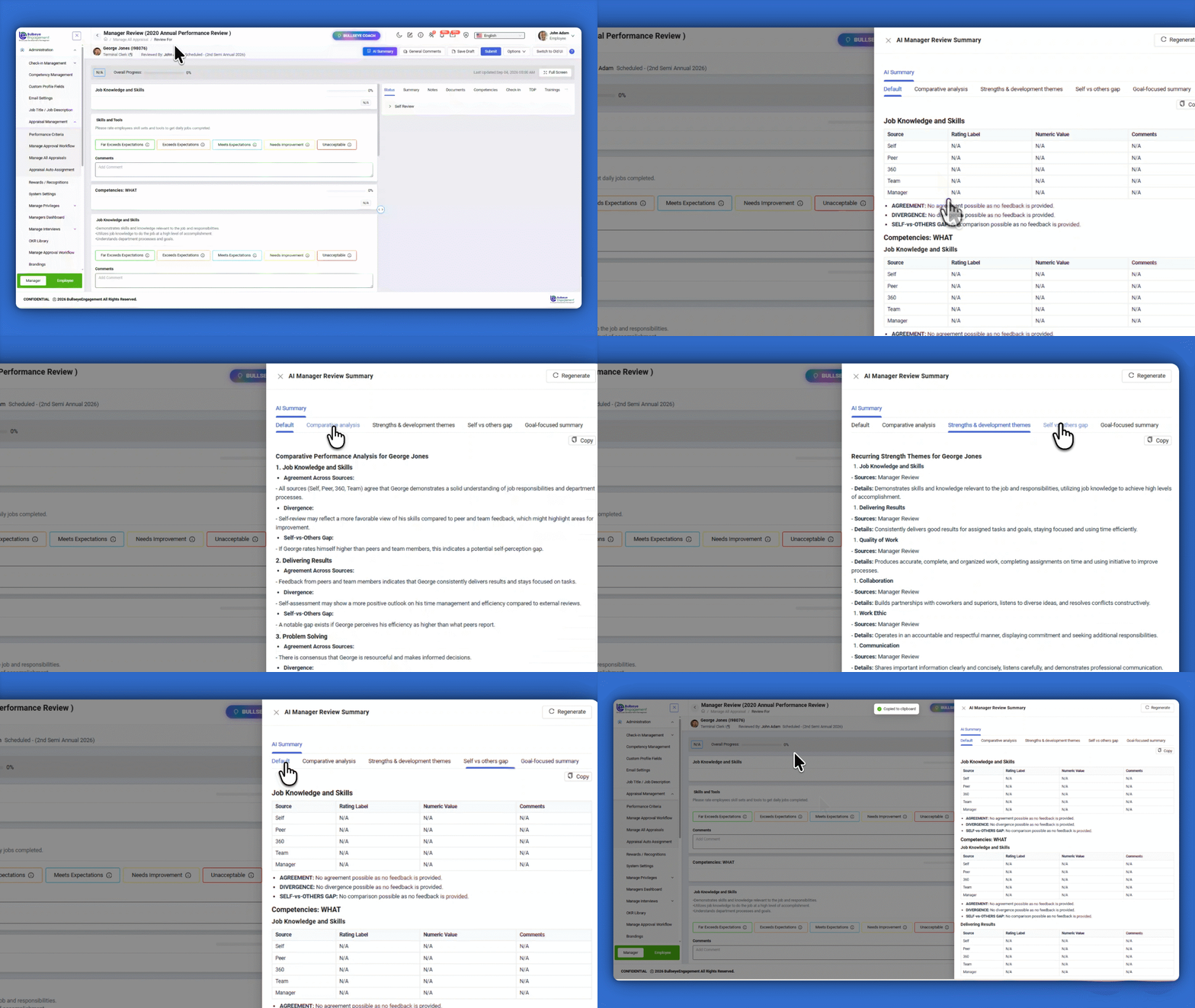
Writing a Manager Review means pulling together self, peer, 360, team, goals, check-ins, and more. AI Manager Review Summary gives you a side-by-side comparison briefing so you can see agreement, gaps, and themes before you write, without drafting the review for you.
What you get
- One briefing that compares feedback across review sources (Self, Peer, 360, Team, Manager, Goals, Check-ins, TDP, and more)
- Patterns and gaps: where sources agree, where they diverge, and where evidence is thin
- Goal and check-in context tied to what is actually on record
- You stay in control: AI does not write your review, assign scores, or fill the form
|
|
How it works
- Open a Manager Review for a team member (Appraisal Review For)
- Click AI Summary in the review top bar
- Read the AI Manager Review Summary briefing in the side drawer
- Optionally Copy or Regenerate, then complete your Manager Review with your own ratings and comments
|
3. Job Description Generator (Job Roles)
Clear role summaries help your team know what success looks like. On Job Title Details, Generate with AI drafts an internal Summary and Job Description from a job template, ready for you to edit and save.
What you get
- Template-based drafts for Summary and Job Description (by role type)
- Optional context: industry, seniority, and location to sharpen the draft
- Preview, regenerate, and insert into the editors before you save
- Built for internal use: role clarity on the Employee Engagement Dashboard, not external job postings
|
|
How it works
- Go to Job Roles, open a job title’s Job Title Details
- Click Generate with AI next to Summary
- Choose a Job Template (and optional industry, seniority, or location), then click Generate
- Review the preview, click Insert & Close, edit as needed, then Update (confirm you have reviewed the AI-generated content)
|
Try them in Talent Portal
Log in to Talent Portal and try these on your next TBS meeting, Manager Review, or job title update.
Open Talent Portal
|
|
Questions? Contact your HR or Talent team administrator.
|
|